


Managed IT Services vs. In-House IT: Which Is Better for Growing Businesses?
By MotivIT, LLC Editorial Team · Published August 5, 2026
Table of Contents
Growth creates new opportunities, but it also makes technology harder to manage.
As your company adds employees, devices, cloud applications, customer accounts, and locations, the IT setup that worked for a smaller team may no longer provide enough coverage. Support requests increase, cybersecurity risks become more complex, employee onboarding takes longer, and business leaders may spend too much time resolving technology problems.
At this stage, many companies begin comparing managed IT services vs. in-house IT.
Should you hire employees who work exclusively for your organization? Should you partner with a Managed IT Services Provider? Or would a co-managed model give your internal team the extra capacity it needs?
Both approaches can work. The right choice depends on your company’s operating model, security requirements, budget, internal expertise, and growth plans.
MotivIT helps growing businesses evaluate these options through scalable managed and co-managed IT support. Its services include employee assistance, remote monitoring, network management, Microsoft 365 support, cybersecurity, cloud services, vendor coordination, and strategic technology planning.
As your company adds employees, devices, cloud applications, customer accounts, and locations, the IT setup that worked for a smaller team may no longer provide enough coverage. Support requests increase, cybersecurity risks become more complex, employee onboarding takes longer, and business leaders may spend too much time resolving technology problems.
At this stage, many companies begin comparing managed IT services vs. in-house IT.
Should you hire employees who work exclusively for your organization? Should you partner with a Managed IT Services Provider? Or would a co-managed model give your internal team the extra capacity it needs?
Both approaches can work. The right choice depends on your company’s operating model, security requirements, budget, internal expertise, and growth plans.
MotivIT helps growing businesses evaluate these options through scalable managed and co-managed IT support. Its services include employee assistance, remote monitoring, network management, Microsoft 365 support, cybersecurity, cloud services, vendor coordination, and strategic technology planning.
Managed IT services are often the better choice for growing businesses that need broader expertise, proactive IT support, stronger cybersecurity, and scalable coverage without hiring a complete internal department. In-house IT may be preferable when the company requires constant on-site support, highly specialized internal knowledge, or direct control over daily technology decisions. Many growing organizations use a co-managed model that combines both.
This guide explains the differences between managed services and internal IT, what each model costs, and how to choose the right IT support for small business growth.
Key Takeaways
- In-house IT provides direct control, familiarity with internal operations, and on-site availability.
- Managed IT services provide access to a broader technical team, continuous monitoring, cybersecurity, help desk support, and scalable expertise.
- The cost of an internal department includes salaries as well as other factors, such as benefits, recruitment, training, tools, and coverage during employee absences.
- Outsourced IT support can help companies access enterprise-level capabilities without building every function internally.
- A co-managed model allows an internal team and a Managed IT Services Provider to divide responsibilities.
- The best choice depends on operational needs, security risks, required support hours, and the company’s growth strategy.
Managed IT Services vs. In-House IT Explained
The main difference between managed IT services and in-house IT is who is responsible for supporting and managing the company’s technology.
An in-house IT employee or department works directly for the organization. The team supports users, maintains devices, resolves technical problems, oversees systems, and helps leadership make technology decisions.
Managed IT services involve partnering with an outside provider under an ongoing service agreement. The provider may handle all IT responsibilities or work alongside existing employees.
The decision is not simply between internal and external support. It is about choosing the structure that gives your company the right combination of expertise, responsiveness, coverage, security, and scalability.
An in-house IT employee or department works directly for the organization. The team supports users, maintains devices, resolves technical problems, oversees systems, and helps leadership make technology decisions.
Managed IT services involve partnering with an outside provider under an ongoing service agreement. The provider may handle all IT responsibilities or work alongside existing employees.
The decision is not simply between internal and external support. It is about choosing the structure that gives your company the right combination of expertise, responsiveness, coverage, security, and scalability.
What Is In-House IT?
In-house IT refers to employees hired directly by the organization to manage its technology.
Depending on the company’s size, this may be one generalist or a larger department with specialists in employee support, cybersecurity, networking, cloud platforms, systems administration, and IT leadership.
Internal employees usually develop a strong understanding of the organization’s systems, workflows, culture, and business priorities. They are also available for face-to-face assistance and can work closely with company leaders.
The challenge is coverage.
One employee may be expected to manage user support, Microsoft 365, network infrastructure, cybersecurity, cloud applications, vendor relationships, compliance, backups, and long-term planning. As the environment becomes more complex, the company may need several specialists to cover these responsibilities effectively.
Depending on the company’s size, this may be one generalist or a larger department with specialists in employee support, cybersecurity, networking, cloud platforms, systems administration, and IT leadership.
Internal employees usually develop a strong understanding of the organization’s systems, workflows, culture, and business priorities. They are also available for face-to-face assistance and can work closely with company leaders.
The challenge is coverage.
One employee may be expected to manage user support, Microsoft 365, network infrastructure, cybersecurity, cloud applications, vendor relationships, compliance, backups, and long-term planning. As the environment becomes more complex, the company may need several specialists to cover these responsibilities effectively.
What Are Managed IT Services?
Managed IT services provide ongoing technology management through an external team.
Instead of contacting a technician only after something breaks, the company works with a provider that assumes responsibility for specific services defined in the agreement.
These services may include:
This model gives a growing company access to multiple technical specialties without hiring a separate employee for every responsibility.
A strong provider should offer more than reactive troubleshooting. It should deliver practical small business IT solutions that improve productivity, security, resilience, and long-term planning.
Instead of contacting a technician only after something breaks, the company works with a provider that assumes responsibility for specific services defined in the agreement.
These services may include:
- Help desk and employee support
- Remote monitoring and management
- Network management
- Proactive IT support
- Patch and update management
- Microsoft 365 administration
- Cloud services
- Backup and disaster recovery
- Vendor and asset management
- Employee onboarding and offboarding
- Cybersecurity services for small business
- Business reviews and technology planning
This model gives a growing company access to multiple technical specialties without hiring a separate employee for every responsibility.
A strong provider should offer more than reactive troubleshooting. It should deliver practical small business IT solutions that improve productivity, security, resilience, and long-term planning.
Managed IT Services vs. In-House IT Comparison
The following table summarizes the main differences.
| Area | In-House IT | Managed IT Services |
|---|---|---|
| Employment model | Employees hired directly by the company | External provider under a service agreement |
| Business knowledge | Deep familiarity with internal systems and culture | Develops knowledge through documentation, onboarding, and account management |
| Range of expertise | Limited to the skills of current employees | Access to specialists across support, networks, security, cloud, and strategy |
| Coverage | Depends on employee schedules and availability | Can offer extended-hours or 24/7 monitoring and support |
| Scalability | Requires recruiting and training additional staff | Services can often scale as users, devices, and locations grow |
| Cost structure | Salaries, benefits, recruitment, tools, and training | Recurring service fee based on scope and service level |
| On-site support | Direct on-site presence | Primarily remote, with on-site support depending on the agreement |
| Cybersecurity | Depends on internal expertise and tools | Security services may be integrated into the managed plan |
| Network monitoring | Managed by internal employees | May include ongoing monitoring through a Network Operations Center |
| Microsoft 365 support | Managed internally | May include user, email, permission, and security administration |
| Backup and recovery | Internal team owns the process | Provider may monitor backups and support disaster recovery |
| Vendor management | Handled by internal staff or leadership | May be included as part of the service |
| Strategic planning | Depends on internal leadership experience | May include business reviews, IT consulting, and technology roadmaps |
| Employee absence | Coverage may be limited when staff are unavailable | Support is provided by a broader team |
| Control | High direct control | Requires clear responsibilities, documentation, and provider accountability |
Neither option is automatically better in every category.
An internal team offers daily proximity and organizational familiarity. A Managed IT Services Provider offers broader capabilities, team-based coverage, and easier scalability. The right decision depends on what your business needs most.
An internal team offers daily proximity and organizational familiarity. A Managed IT Services Provider offers broader capabilities, team-based coverage, and easier scalability. The right decision depends on what your business needs most.
The Cost of In-House IT
The cost of internal IT involves more than salary.
The U.S. Bureau of Labor Statistics reported a median annual wage of $96,800 for network and computer systems administrators in May 2024. Computer network support specialists had a median annual wage of $73,340, while computer user support specialists had a median of $60,340.
These figures represent wages only. The total cost of hiring may include various factors, such as payroll taxes, benefits, and training, depending on the organization’s needs:
A single employee may be sufficient when the technology environment is simple. However, expecting one person to provide help desk assistance, network management, cloud administration, cybersecurity, compliance support, and strategic planning can create gaps.
Growing companies should therefore evaluate the cost of the team they truly need—not just the cost of one general IT hire.
The U.S. Bureau of Labor Statistics reported a median annual wage of $96,800 for network and computer systems administrators in May 2024. Computer network support specialists had a median annual wage of $73,340, while computer user support specialists had a median of $60,340.
These figures represent wages only. The total cost of hiring may include various factors, such as payroll taxes, benefits, and training, depending on the organization’s needs:
- Payroll taxes
- Health and retirement benefits
- Recruitment expenses
- Training and certifications
- Paid leave
- Overtime or after-hours coverage
- IT management tools
- Cybersecurity software
- Backup systems
- Employee turnover and replacement costs
A single employee may be sufficient when the technology environment is simple. However, expecting one person to provide help desk assistance, network management, cloud administration, cybersecurity, compliance support, and strategic planning can create gaps.
Growing companies should therefore evaluate the cost of the team they truly need—not just the cost of one general IT hire.
The Cost of Outsourced IT Support
Outsourced IT support is commonly priced through a recurring monthly agreement.
The amount depends on factors such as:
This model can make expenses more predictable, but companies should review the service scope carefully.
A low monthly fee may exclude after-hours assistance, cybersecurity platforms, backup monitoring, Microsoft 365 administration, projects, or on-site support. A more complete plan may include services the company would otherwise need to purchase and manage separately.
The most useful comparison is not simply:
*Which option has the lower monthly price?*
A better question is:
*Which option provides the level of support, security, coverage, and expertise our business requires?*
Managed services may reduce the need for several full-time hires, but they are not automatically less expensive for every company. The value depends on how well the plan matches the organization’s actual needs.
The amount depends on factors such as:
- Number of users and devices
- Servers and network equipment
- Support hours
- Cybersecurity requirements
- Cloud and Microsoft 365 needs
- Backup and recovery services
- Compliance responsibilities
- Number of offices
- Complexity of the technology environment
This model can make expenses more predictable, but companies should review the service scope carefully.
A low monthly fee may exclude after-hours assistance, cybersecurity platforms, backup monitoring, Microsoft 365 administration, projects, or on-site support. A more complete plan may include services the company would otherwise need to purchase and manage separately.
The most useful comparison is not simply:
*Which option has the lower monthly price?*
A better question is:
*Which option provides the level of support, security, coverage, and expertise our business requires?*
Managed services may reduce the need for several full-time hires, but they are not automatically less expensive for every company. The value depends on how well the plan matches the organization’s actual needs.
Expertise and Technology Coverage
One of the biggest differences in the managed IT services vs. in-house IT decision is the range of expertise available.
Modern business technology spans many specialized areas:
It is difficult for one employee to maintain deep expertise across every area.
A managed provider can assign different responsibilities to specialized teams. Help desk technicians support employees, network analysts monitor infrastructure, security professionals manage protection tools, and account managers help align technology with business goals.
This broader coverage can be valuable when a company is expanding faster than its internal IT capabilities.
Modern business technology spans many specialized areas:
- Employee support
- Network infrastructure
- Cybersecurity
- Cloud platforms
- Microsoft 365
- Backup and disaster recovery
- Mobile devices
- Compliance
- Vendor management
- Strategic planning
It is difficult for one employee to maintain deep expertise across every area.
A managed provider can assign different responsibilities to specialized teams. Help desk technicians support employees, network analysts monitor infrastructure, security professionals manage protection tools, and account managers help align technology with business goals.
This broader coverage can be valuable when a company is expanding faster than its internal IT capabilities.
Cybersecurity and Risk Management
Cybersecurity should be a central part of the decision.
Growing companies add users, devices, cloud accounts, vendors, and sensitive information. Each addition creates new access requirements and potential risks.
An internal team can provide strong security when it has sufficient staffing, expertise, tools, and budget. The challenge is that smaller organizations may have only one or two technical employees managing both everyday support and cybersecurity.
NIST developed its Cybersecurity Framework 2.0 Small Business Quick-Start Guide sor small and midsize organizations with modest or developing cybersecurity programs.
A managed IT provider may help integrate security into daily operations through:
Business leaders should confirm exactly which protections are included. The term “managed IT” does not mean every security service is automatically covered.
Growing companies add users, devices, cloud accounts, vendors, and sensitive information. Each addition creates new access requirements and potential risks.
An internal team can provide strong security when it has sufficient staffing, expertise, tools, and budget. The challenge is that smaller organizations may have only one or two technical employees managing both everyday support and cybersecurity.
NIST developed its Cybersecurity Framework 2.0 Small Business Quick-Start Guide sor small and midsize organizations with modest or developing cybersecurity programs.
A managed IT provider may help integrate security into daily operations through:
- Endpoint protection
- Email security
- Multi-factor authentication
- Patch management
- Firewall management
- Account and access reviews
- Vulnerability scanning
- Security awareness training
- Backup monitoring
- Incident response planning
Business leaders should confirm exactly which protections are included. The term “managed IT” does not mean every security service is automatically covered.
Availability and Response Times
An internal IT employee is often available during normal working hours and can respond directly to on-site concerns.
This can be valuable for companies with specialized equipment, complex facilities, or frequent physical support requirements.
The limitation becomes clear when that employee is sick, on leave, handling another critical issue, or unavailable after hours.
An MSP uses a team-based model. Employee requests are submitted through a help desk, categorized by priority, and routed to the appropriate technician.
A Service Level Agreement should explain:
Companies should not assume either model automatically provides faster service. Response quality depends on staffing, documentation, processes, and accountability.
This can be valuable for companies with specialized equipment, complex facilities, or frequent physical support requirements.
The limitation becomes clear when that employee is sick, on leave, handling another critical issue, or unavailable after hours.
An MSP uses a team-based model. Employee requests are submitted through a help desk, categorized by priority, and routed to the appropriate technician.
A Service Level Agreement should explain:
- Support hours
- Response targets
- Priority levels
- Escalation procedures
- On-site availability
- Emergency definitions
- Services included in the agreement
Companies should not assume either model automatically provides faster service. Response quality depends on staffing, documentation, processes, and accountability.
Scalability for Growing Businesses
Growth can make an internal model more difficult to maintain.
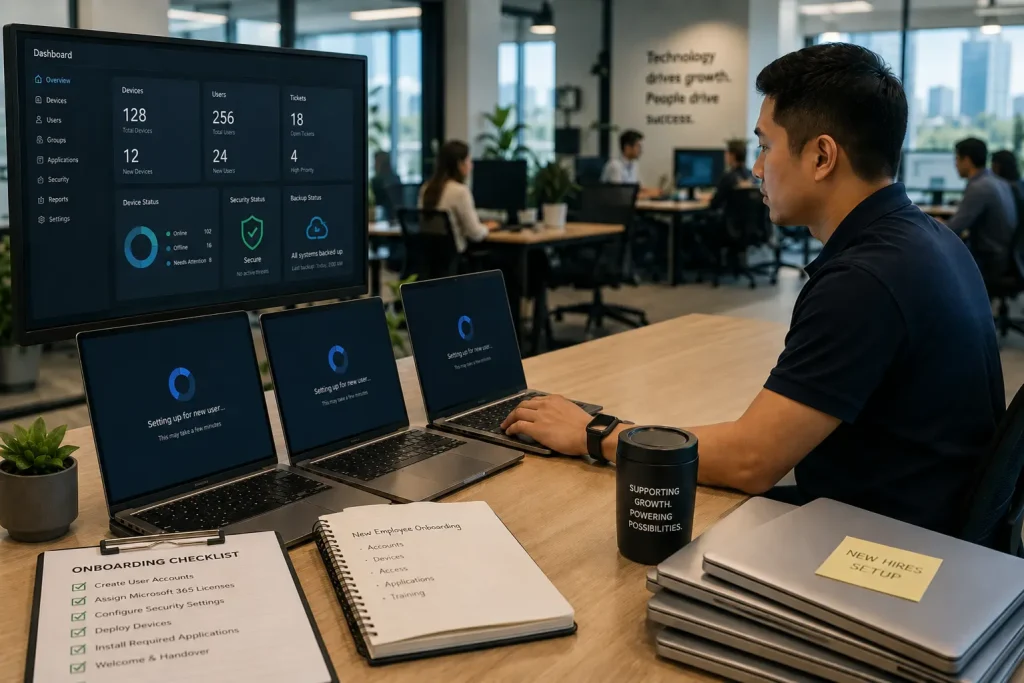
Adding employees may require new devices, software licenses, Microsoft 365 accounts, security permissions, cloud access, and help desk capacity. Opening another office introduces network equipment, internet providers, workstations, and vendor coordination.
An internal team can scale, but doing so requires recruiting, onboarding, and retaining additional people.
Managed services can often expand more quickly because the provider already has support teams, monitoring platforms, service processes, and technical specialists in place.
Adding employees may require new devices, software licenses, Microsoft 365 accounts, security permissions, cloud access, and help desk capacity. Opening another office introduces network equipment, internet providers, workstations, and vendor coordination.
An internal team can scale, but doing so requires recruiting, onboarding, and retaining additional people.
Managed services can often expand more quickly because the provider already has support teams, monitoring platforms, service processes, and technical specialists in place.
IT specialist setting up devices and user accounts for a growing business
This makes outsourced IT support useful for companies that are:
The provider should still demonstrate that it can scale without reducing support quality.
This makes outsourced IT support useful for companies that are:
- Hiring rapidly
- Opening new offices
- Supporting remote or hybrid employees
- Entering new markets
- Migrating systems to the cloud
- Increasing cybersecurity requirements
- Acquiring another business
- Standardizing technology across locations
The provider should still demonstrate that it can scale without reducing support quality.
Control and Business Knowledge
One of the strongest advantages of in-house IT is organizational knowledge.
An internal employee works directly with leaders and staff. Over time, that person learns which systems matter most, how departments operate, and which technology issues create the greatest business impact.
Some leaders worry that outsourced support will feel disconnected or impersonal.
That risk can be reduced through:
A strong provider should understand the company’s critical systems, locations, working hours, security obligations, vendors, recovery priorities, and growth plans.
The provider should operate as a technology partner—not an anonymous repair service.
An internal employee works directly with leaders and staff. Over time, that person learns which systems matter most, how departments operate, and which technology issues create the greatest business impact.
Some leaders worry that outsourced support will feel disconnected or impersonal.
That risk can be reduced through:
- Detailed documentation
- Assigned account management
- Regular business reviews
- Standardized onboarding
- Clear escalation procedures
- Consistent communication
A strong provider should understand the company’s critical systems, locations, working hours, security obligations, vendors, recovery priorities, and growth plans.
The provider should operate as a technology partner—not an anonymous repair service.
Real-World Scenarios for Growing Businesses
The right IT model becomes clearer when it is connected to everyday business operations.
A Tech Startup Expanding Its Team
A San Jose startup grows from 15 to 60 employees within a year.
The company must prepare laptops, create Microsoft 365 accounts, manage permissions, support hybrid employees, improve security, and maintain an accurate device inventory.
One internal employee may struggle to handle onboarding, employee requests, security alerts, and strategic projects at the same time.
An MSP can provide additional help desk capacity, device management, network monitoring, cybersecurity, and standardized onboarding without requiring the company to hire several specialists immediately.
The company must prepare laptops, create Microsoft 365 accounts, manage permissions, support hybrid employees, improve security, and maintain an accurate device inventory.
One internal employee may struggle to handle onboarding, employee requests, security alerts, and strategic projects at the same time.
An MSP can provide additional help desk capacity, device management, network monitoring, cybersecurity, and standardized onboarding without requiring the company to hire several specialists immediately.
A Manufacturing Business With On-Site Systems
A manufacturer relies on production workstations, local network equipment, vendor applications, printers, and specialized hardware.
Because many problems require physical access, an internal technician may provide important operational value.
However, the employee may still need help with cybersecurity, after-hours network monitoring, backup planning, or complex infrastructure projects.
A co-managed model allows the internal technician to focus on on-site operations while the provider handles monitoring, security, escalation, and specialized projects.
Because many problems require physical access, an internal technician may provide important operational value.
However, the employee may still need help with cybersecurity, after-hours network monitoring, backup planning, or complex infrastructure projects.
A co-managed model allows the internal technician to focus on on-site operations while the provider handles monitoring, security, escalation, and specialized projects.
A Healthcare Practice With Compliance Requirements
A growing healthcare organization handles sensitive patient information, scheduling platforms, employee devices, cloud applications, and multiple locations.
It needs reliable backups, strong access controls, responsive support, cybersecurity tools, and compliance-aware procedures.
Building an internal department with every required specialty may be difficult. Outsourced support can provide broader expertise while internal leadership retains control over clinical workflows and business priorities.
It needs reliable backups, strong access controls, responsive support, cybersecurity tools, and compliance-aware procedures.
Building an internal department with every required specialty may be difficult. Outsourced support can provide broader expertise while internal leadership retains control over clinical workflows and business priorities.
An Accounting Firm During Tax Season
An accounting practice depends on email, Microsoft 365, secure file sharing, tax applications, cloud storage, and reliable backups.
During tax season, even a short access problem can delay filings, client responses, and financial work.
An internal employee may understand the firm’s systems well but become overwhelmed by user requests during busy periods. A managed provider can supply extra help desk capacity, monitor backups, protect user accounts, and assist with Microsoft 365 administration.
During tax season, even a short access problem can delay filings, client responses, and financial work.
An internal employee may understand the firm’s systems well but become overwhelmed by user requests during busy periods. A managed provider can supply extra help desk capacity, monitor backups, protect user accounts, and assist with Microsoft 365 administration.
A Lending Company Managing Sensitive Documents
A lending business may rely on loan-origination platforms, customer portals, financial records, document-management systems, and third-party verification services.
Its IT environment must protect borrower information while keeping applications and customer communications available.
A Managed IT Services Provider can help coordinate endpoint security, account access, vendor support, backup monitoring, and business continuity. This reduces the likelihood that one technical issue will delay loan processing or expose sensitive documents.
Its IT environment must protect borrower information while keeping applications and customer communications available.
A Managed IT Services Provider can help coordinate endpoint security, account access, vendor support, backup monitoring, and business continuity. This reduces the likelihood that one technical issue will delay loan processing or expose sensitive documents.
A Financial Services Firm With Security Requirements
A financial services company may manage confidential client information, regulatory records, payment-related systems, and secure communications.
It may require stronger cybersecurity services for small business, including MFA, email protection, device management, patching, logging, backup monitoring, and documented response procedures.
A co-managed arrangement can allow internal employees to maintain business-specific systems while the MSP provides security oversight, monitoring, and escalation support.
It may require stronger cybersecurity services for small business, including MFA, email protection, device management, patching, logging, backup monitoring, and documented response procedures.
A co-managed arrangement can allow internal employees to maintain business-specific systems while the MSP provides security oversight, monitoring, and escalation support.
Questions to Ask Before Choosing an IT Model
Before deciding between managed IT services and in-house IT, ask:
The answers should reveal whether the company’s greatest need is control, coverage, specialized expertise, scalability, or a combination of all four.
- How many employees, devices, and locations do we support?
- Which systems are critical to daily operations?
- How much downtime can the business tolerate?
- Do employees require assistance outside normal working hours?
- Do we have internal cybersecurity expertise?
- Are backups monitored and regularly tested?
- Who manages Microsoft 365, cloud platforms, and user permissions?
- Can the current team support planned growth?
- What happens when the internal IT employee is unavailable?
- Do we need frequent on-site assistance?
- What is the total cost of hiring the internal team we truly need?
- Which services are included in an MSP agreement?
- Would a co-managed model provide the right balance?
- How will technology decisions support long-term goals?
The answers should reveal whether the company’s greatest need is control, coverage, specialized expertise, scalability, or a combination of all four.
When In-House IT Is the Better Choice
In-house IT may be the stronger option when:
The key phrase is properly staffed.
One overextended employee is not the same as a complete internal IT department. The team must have enough capacity and expertise to manage support, infrastructure, cybersecurity, recovery, and strategic projects.
- The company needs constant physical support
- Technology is highly specialized or proprietary
- The organization requires direct control over daily IT decisions
- The business can afford a properly staffed department
- Internal systems require deep operational knowledge
- Leadership wants IT employees embedded in daily planning
- Security or regulatory requirements favor dedicated internal control
The key phrase is properly staffed.
One overextended employee is not the same as a complete internal IT department. The team must have enough capacity and expertise to manage support, infrastructure, cybersecurity, recovery, and strategic projects.
When Managed IT Services Are the Better Choice
Managed IT services may be the stronger fit when:
This model is particularly useful for companies that need enterprise-level capabilities but are not ready to build a large internal department.
- The business has outgrown reactive or informal support
- Employees need a reliable help desk
- Internal expertise is limited
- Security concerns are increasing
- The company is adding users or locations
- Leadership needs more predictable IT planning
- Systems require proactive monitoring
- The business needs backup and disaster recovery support
- Remote employees need consistent assistance
- The organization wants strategic IT guidance without hiring a complete leadership team
This model is particularly useful for companies that need enterprise-level capabilities but are not ready to build a large internal department.
When a Co-Managed IT Model Makes Sense
The decision does not need to be all or nothing.
Co-managed IT combines internal employees with an outside provider.
Co-managed IT combines internal employees with an outside provider.
| Internal IT Team | Managed IT Services Provider |
|---|---|
| On-site employee support | After-hours or overflow help desk |
| Business application knowledge | Network monitoring |
| Internal project coordination | Cybersecurity services |
| Department relationships | Backup and disaster recovery |
| Local hardware support | Cloud and Microsoft 365 expertise |
| Daily operational priorities | Escalation and specialized technical support |
This arrangement can help growing companies retain internal control while reducing workload and filling expertise gaps.
How MotivIT Supports Growing Businesses
MotivIT provides managed IT services for organizations that need scalable technical support without building every capability internally.
Its service model includes options for employee support, remote monitoring, network management, cybersecurity, Microsoft 365, vendor and asset management, cloud services, business reviews, and technology planning.
MotivIT’s Network Operations Center provides continuous monitoring and management for business infrastructure, while its Global Service Desk gives employees a structured channel for technical assistance. Its cloud services also support companies that are migrating systems, improving remote access, or preparing infrastructure for growth.
For growing businesses, this means support can expand as the company adds employees, devices, offices, and security requirements.
MotivIT can function as the primary IT team for a small business or work alongside internal employees through a co-managed approach.
Its service model includes options for employee support, remote monitoring, network management, cybersecurity, Microsoft 365, vendor and asset management, cloud services, business reviews, and technology planning.
MotivIT’s Network Operations Center provides continuous monitoring and management for business infrastructure, while its Global Service Desk gives employees a structured channel for technical assistance. Its cloud services also support companies that are migrating systems, improving remote access, or preparing infrastructure for growth.
For growing businesses, this means support can expand as the company adds employees, devices, offices, and security requirements.
MotivIT can function as the primary IT team for a small business or work alongside internal employees through a co-managed approach.
Review MotivIT’s managed IT plans to compare support coverage, monitoring, cybersecurity, Microsoft 365, and strategic services for your growing business.
Frequently Asked Questions About Managed IT Services vs. In-House IT
How do I know whether my company has outgrown its current IT support?
Common signs include recurring technical problems, slow response times, inconsistent security controls, unmonitored backups, an overloaded internal employee, or difficulty supporting new users and locations.
What should I look for in a Managed IT Services Provider?
Look for clear service coverage, documented response expectations, proactive monitoring, cybersecurity capabilities, Microsoft 365 support, backup oversight, reporting, strategic planning, and experience with businesses similar to yours.
Is managed IT cheaper than hiring an internal department?
It can be, especially when the company needs several technical specialties. However, the comparison should include salaries, benefits, recruitment, training, software tools, coverage, and cybersecurity—not only the monthly MSP fee.
What should be included in a managed services agreement?
The agreement should explain covered users and devices, support hours, response targets, included cybersecurity tools, monitoring responsibilities, backups, Microsoft 365 administration, on-site service, project work, and potential additional fees.
Can an MSP replace an internal IT department?
An MSP can function as the primary IT team for many small and midsize companies. More complex organizations may use the provider to supplement internal staff rather than replace them.
Can managed IT services support regulated industries?
Yes, but the provider should understand the company’s industry, data, security requirements, and compliance responsibilities. Businesses in healthcare, financial services, lending, legal services, and accounting should evaluate the provider’s relevant experience carefully.
What is co-managed IT?
Co-managed IT is a shared model in which an internal team and an MSP divide responsibilities. It allows the organization to retain internal knowledge while gaining additional expertise, tools, and support coverage.
How long does it take to transition to managed IT services?
The timeline depends on the size and condition of the environment. Onboarding may include discovery, documentation, installation of monitoring tools, account cleanup, security reviews, asset inventory, and backup verification.
Will an MSP provide on-site support?
Some providers offer on-site assistance, while others are primarily remote. Ask whether on-site support is included, available as needed, or billed separately.
How are urgent IT problems handled?
A good provider should define severity levels, response targets, escalation procedures, communication methods, and after-hours coverage in its service agreement.
What small business IT solutions should a growing company prioritize?
Priority services often include help desk support, network monitoring, cybersecurity, Microsoft 365 administration, patching, backups, disaster recovery, onboarding, vendor management, and technology planning.
Does MotivIT provide managed and co-managed IT services?
Yes. MotivIT can serve as a company’s primary IT provider or support an existing internal team with monitoring, cybersecurity, help desk assistance, cloud services, Microsoft 365, backups, and strategic planning.
Choose an IT Model That Can Grow With Your Business
The choice between managed IT services vs. in-house IT should not be based only on monthly cost or company size.
It should reflect what your business needs to operate securely, support employees, serve customers, and grow without creating unnecessary technology risk.
In-house IT offers direct control, organizational knowledge, and on-site availability. Managed IT services provide broader expertise, team-based coverage, proactive monitoring, cybersecurity, and scalability. A co-managed model can combine the advantages of both.
For many growing businesses, the best option is the one that removes technology bottlenecks and gives leadership confidence that IT can support the next stage of growth.
It should reflect what your business needs to operate securely, support employees, serve customers, and grow without creating unnecessary technology risk.
In-house IT offers direct control, organizational knowledge, and on-site availability. Managed IT services provide broader expertise, team-based coverage, proactive monitoring, cybersecurity, and scalability. A co-managed model can combine the advantages of both.
For many growing businesses, the best option is the one that removes technology bottlenecks and gives leadership confidence that IT can support the next stage of growth.
Talk with MotivIT about a managed or co-managed IT strategy designed to improve employee support, strengthen cybersecurity, reduce operational risk, and scale with your business.
Build an IT Support Strategy for Your Next Stage of Growth
Review your current IT coverage, cybersecurity, and support needs with MotivIT—and identify the right managed, in-house, or co-managed model for your business.