


Managed IT vs. Break-Fix: Choosing the Right IT Support Plan for Your Small Business
July 8, 2026

Table of Contents
For small businesses, the choice between Managed IT Services and Break-Fix IT Support can shape how often problems happen, how quickly they are resolved, and how predictable IT costs become.
Managed IT Services focus on prevention through ongoing monitoring, maintenance, cybersecurity, remote IT support, network management, and strategic planning. Break-Fix IT Support focuses on repairing issues after something has already failed.
For growing businesses in San Jose, especially in healthcare, professional services, manufacturing, retail, and tech startups, this decision matters. The right IT support model can help reduce downtime, strengthen business continuity, protect data, and give employees the support they need to stay productive.
Managed IT Services and Break-Fix IT Support Explained
This often includes help desk support, remote IT support, patch management, cybersecurity management, backup oversight, Microsoft 365 support, network management, and IT consulting. The goal is to keep systems reliable and reduce the likelihood of business disruptions.
Break-Fix IT Support works differently. Under this model, you contact an IT provider only when something stops working. The provider diagnoses the issue, performs the repair, and bills you for the work completed.
The main difference is simple: Managed IT Services help prevent problems, while Break-Fix IT Support fixes problems after they occur.
For businesses that rely on technology to serve customers, process transactions, communicate with employees, manage records, or operate production systems, that difference can have a major business impact.
Industry Trends Driving Businesses Toward Managed IT Support
Cybersecurity is also a major concern. IBM’s 2025 Cost of a Data Breach Report found that the global average cost of a data breach reached $4.44 million. Verizon’s 2025 Data Breach Investigations Report analyzed 22,052 real-world security incidents and 12,195 confirmed data breaches, showing how widespread security incidents remain across organizations of all sizes.
Downtime is another important factor. Atlassian references the commonly cited Gartner benchmark that average downtime can cost around $5,600 per minute, while also noting that this is only an average and actual costs vary by company size, industry, revenue model, and outage duration.
For small businesses, the exact cost may be lower than enterprise-level benchmarks, but the impact can still be serious. Lost productivity, missed sales, delayed customer service, emergency IT repairs, and reputation damage can quickly add up.
Managed IT vs. Break-Fix Pricing and Cost Predictability
Managed IT Services typically use a recurring monthly model. Pricing may be based on users, devices, service levels, cybersecurity needs, support hours, or the complexity of the business environment. This gives business owners clearer expectations about what is included and how much IT support will cost each month.
Break-Fix IT Support usually follows a pay-as-you-go model. You pay when a technician is needed, often based on labor, service calls, emergency response, project work, hardware replacement, or after-hours support.
At first, break-fix support may seem less expensive because there is no monthly commitment. However, the real comparison should include more than the repair invoice. Business owners should also consider employee downtime, delayed customer service, lost revenue opportunities, cybersecurity exposure, and the cost of emergency response.
Managed IT Services can offer better cost predictability because support, monitoring, maintenance, and security are planned in advance. Break-fix support can be harder to budget for because costs depend on when issues happen and how serious they become.
Break-Fix IT Support Business Impact
However, this model becomes riskier as the business grows.
The biggest limitation is that support begins after the disruption has already affected operations. If employees cannot access shared files, email stops working, a device fails, or a cybersecurity issue spreads across systems, the business has already lost time before support begins.
Break-fix support can also create uncertainty. There may be no guaranteed response time, no ongoing monitoring, no regular maintenance, and limited visibility into system health. For businesses that rely on Microsoft 365, customer databases, payment systems, scheduling tools, manufacturing systems, or cloud applications, this lack of predictability can become a serious operational risk.
The repair bill is only one part of the cost. The larger impact often comes from downtime, lost productivity, delayed customer response, and business disruption.
Managed IT Services Business Benefits
With a managed IT model, an MSP helps maintain the health, security, and performance of the IT environment on an ongoing basis. This can include monitoring systems, applying updates, managing user support, strengthening cybersecurity, checking backups, and helping the business plan technology improvements.
For small businesses, this approach can help reduce the pressure on internal teams. Employees have a clear support path when issues happen, and business owners gain better visibility into technology risks.
Managed IT Services are especially valuable for businesses that depend on stable systems every day. A healthcare office may need reliable access to patient-related systems. A professional services firm may depend on secure files and Microsoft 365. A manufacturing business may rely on networked systems and production-related technology. A tech startup may need scalable support for hybrid teams and cloud tools.
In each case, IT support is not just a technical need. It directly supports business continuity, productivity, and customer experience.
Managed IT vs. Break-Fix Comparison Table
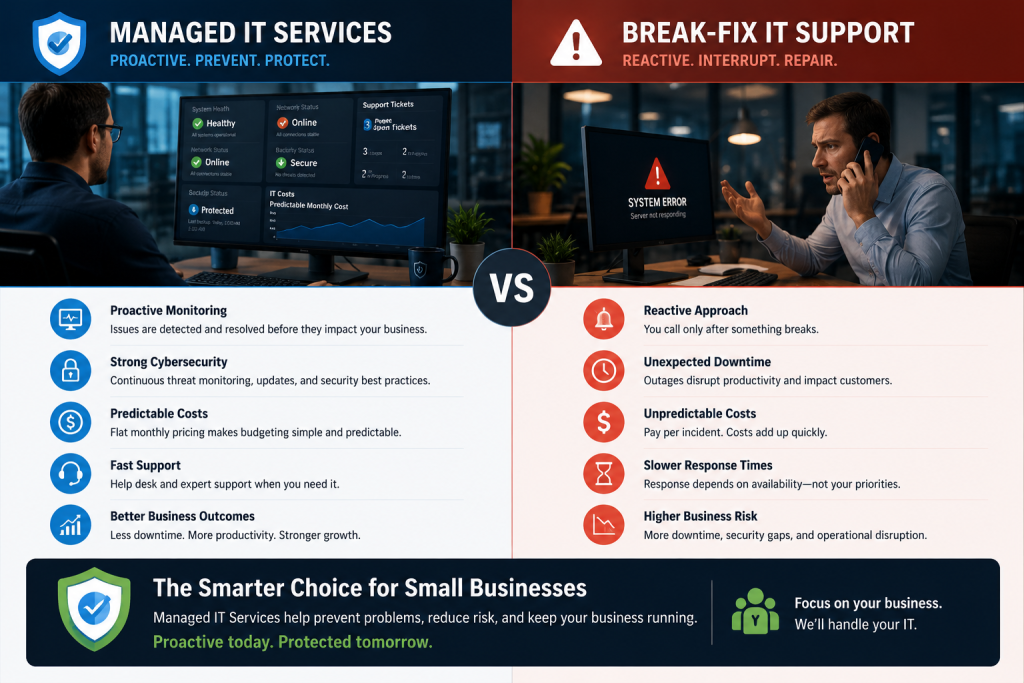
| Category | Managed IT Services | Break-Fix IT Support |
|---|---|---|
| Support Style | Proactive and ongoing | Reactive and issue-based |
| Best For | Businesses that rely on technology daily | Very small businesses with occasional IT needs |
| Pricing | Predictable monthly service model | Pay-as-you-go, often less predictable |
| Monitoring | Ongoing system and network monitoring | Usually none unless requested |
| Cybersecurity | Often included as part of the service plan | Usually handled separately or after an issue occurs |
| Backups | Backup oversight and disaster recovery planning may be included | Usually addressed only when a backup or recovery issue happens |
| Microsoft 365 Support | Often included for users, access, email, and cloud collaboration | Typically billed as needed |
| Network Management | Ongoing network management and performance support | Network issues repaired after they occur |
| Remote IT Support | Commonly included for faster resolution | May be available but often billed per incident |
| Service Level Agreements | More likely to include defined expectations and response processes | Less likely to include strong response guarantees |
| Strategic Planning | Often includes IT consulting, reviews, and planning | Usually limited to repairs or projects |
| Business Continuity | Focuses on prevention, recovery, and resilience | Focuses on restoring service after disruption |
| Long-Term Value | Helps reduce recurring issues and improve IT maturity | May become costly if issues are frequent |
Managed IT Services for Downtime Reduction and Business Continuity
Managed IT Services help reduce downtime by identifying and addressing issues before they become major disruptions. A provider may detect failing hardware, backup problems, security vulnerabilities, or performance issues early enough to prevent an outage or reduce its impact.
This is especially important for San Jose businesses operating in fast-moving industries. A few hours of downtime can affect client communication, appointment scheduling, production timelines, sales activity, or internal collaboration.
A managed IT model supports business continuity by combining proactive monitoring, remote IT support, backup oversight, cybersecurity tools, patch management, and incident response processes. Instead of waiting for systems to fail, the business has a support structure designed to keep operations running.
Cybersecurity and Risk Management in IT Support Plans
With Break-Fix IT Support, cybersecurity may only be addressed after a problem happens. A business may call for help after a phishing incident, malware infection, suspicious login, or compromised device. At that point, the risk may already have affected operations or exposed sensitive data.
Managed IT Services usually include more proactive security support. Depending on the plan, this may include endpoint protection, email filtering, patch management, multi-factor authentication support, firewall hardening, security awareness training, vulnerability scanning, backup planning, and incident response guidance.
This matters for small businesses because cyber risk is not limited to large companies. Small businesses often handle sensitive information, including customer records, employee data, financial documents, healthcare-related information, and business credentials.
For businesses in healthcare, finance, professional services, and technology, cybersecurity is not only about protection. It also supports compliance readiness, customer trust, and operational resilience.
Remote IT Support, Microsoft 365, and Modern Work Needs
This makes remote IT support more important.
A managed IT provider can often resolve issues without waiting for an on-site visit. This can help employees get support faster, whether they are in the office, working from home, or supporting clients in the field.
Microsoft 365 support is another important factor. Many business disruptions involve email access, user permissions, account security, file sharing, device access, or cloud collaboration. A managed IT model can help keep these tools organized, secured, and supported.
For San Jose businesses with hybrid teams, multiple locations, or global clients, remote support and cloud management can make IT support more flexible and responsive.
Service Level Agreements and IT Provider Accountability
For Managed IT Services, SLAs often help clarify response times, support availability, escalation procedures, covered services, monitoring expectations, maintenance responsibilities, and security commitments. This gives business owners a clearer understanding of what happens when support is needed.
Break-Fix IT Support arrangements often provide fewer formal guarantees. Because there is no ongoing service relationship, response times may depend on technician availability and workload. During an emergency, this can create uncertainty.
For businesses that rely heavily on technology, accountability matters. If cloud applications, customer systems, or internal operations are affected, the business needs to know how support requests will be handled and how critical issues will be prioritized.
Hybrid IT Support for Small Businesses
Some companies use a hybrid approach, combining managed services for critical systems with project-based or on-demand support for specific needs. For example, a business may use managed services for cybersecurity, monitoring, Microsoft 365 support, and employee help desk needs, while using project-based support for office moves, hardware upgrades, cloud migrations, or infrastructure improvements.
This can be a practical option for businesses transitioning away from break-fix support. It allows the company to protect the most important systems first while still having flexibility for occasional projects.
The key is clarity. Business owners should understand what is included in the managed service agreement, what is billed separately, and how support requests are prioritized.
San Jose Small Business IT Support Considerations
Different industries have different IT priorities.
Healthcare practices may need secure access, backup reliability, and compliance-aware support. Professional services firms often need Microsoft 365 support, secure file access, and responsive help desk assistance. Manufacturing businesses may need stable networks, workstation support, and business continuity planning. Tech startups may need scalable IT support, remote IT support, onboarding support, and cloud management.
Because of these differences, business owners should avoid choosing an IT support model based only on price. The better question is whether the support model matches the business’s operational needs, security risks, growth plans, and tolerance for downtime.
Choosing the Right IT Support Plan for Your Business
Break-Fix IT Support may still be appropriate for organizations with minimal technology needs and limited dependence on IT. However, Managed IT Services are generally the stronger choice when the business needs reliable support, cybersecurity protection, predictable costs, reduced downtime, and a technology strategy that can scale with growth.
The decision often comes down to risk. If your business can tolerate downtime, unpredictable repair costs, and limited support guarantees, break-fix may be enough. If your business depends on uptime, secure systems, remote work tools, Microsoft 365, and fast employee support, managed IT is likely the better fit.
How MotivIT Supports Businesses Moving Beyond Break-Fix IT

MotivIT helps businesses with managed IT services, remote IT support, network management, cybersecurity protection, Microsoft 365 support, help desk assistance, backup planning, and strategic IT consulting.
The goal is not just to fix technical problems. It is to help businesses reduce risk, improve productivity, strengthen security, and plan technology around growth.
For San Jose businesses, MotivIT offers support that is local in focus but scalable for companies with remote teams, multiple locations, or broader operational needs.
If your business is ready to move away from reactive IT support, compare MotivIT’s managed IT plans and see which level of support fits your team, systems, and growth goals.
Frequently Asked Questions About Managed IT vs. Break-Fix Support
What is the difference between Managed IT Services and Break-Fix IT Support?
Managed IT Services provide ongoing monitoring, maintenance, cybersecurity, support, and planning. Break-Fix IT Support provides help only after something breaks or stops working.
Is Managed IT better than Break-Fix IT Support for small businesses?
Managed IT is usually better for small businesses that rely on technology every day. It provides more predictable support, stronger cybersecurity, proactive monitoring, and better long-term planning.
When does Break-Fix IT Support make sense?
Break-Fix IT Support may make sense for very small businesses with minimal technology needs, low downtime risk, and only occasional technical issues.
What should be included in a Managed IT Services plan?
A strong Managed IT Services plan may include help desk support, network management, remote IT support, Microsoft 365 support, cybersecurity protection, patch management, backup oversight, SLAs, and strategic IT consulting.
Does Managed IT Support help with business continuity?
Yes. Managed IT Services can support business continuity through proactive monitoring, backup planning, disaster recovery support, cybersecurity controls, and faster incident response.
What is an MSP?
An MSP, or Managed Service Provider, is an IT provider that manages and supports a business’s technology environment on an ongoing basis. MSPs often provide monitoring, help desk support, cybersecurity, cloud support, and IT consulting.
Does MotivIT provide Managed IT Services in San Jose?
Yes. MotivIT provides managed IT services for San Jose businesses that need reliable support, stronger cybersecurity, remote IT support, network management, and scalable IT planning.
Choose a Smarter IT Support Model for Long-Term Stability
Break-Fix IT Support reacts after problems happen. Managed IT Services help prevent problems, support employees, protect systems, and create a more reliable technology foundation.
For growing San Jose businesses, proactive IT support can provide the stability needed to serve customers, support teams, and scale with confidence.
Talk to MotivIT about building a managed IT support plan that helps reduce downtime, strengthen cybersecurity, and support your business growth.
Ready to Move Beyond Break-Fix IT?
Get a managed IT support plan that helps reduce downtime, strengthen security, and keep your business running with confidence.