


Why Small Businesses Are Moving from Break-Fix IT to Managed IT Services
By MotivIT, LLC Editorial Team · Published August 19, 2026

Table of Contents
When email, cloud applications, payment systems, customer records, or shared files become unavailable, employees lose productive time and customers experience delays. Business owners may then spend hours coordinating technicians and vendors while trying to understand what failed.
The financial impact can rise quickly. Uptime Institute’s 2026 Annual Outage Analysis found that 57% of surveyed organizations said their most recent major outage cost more than $100,000, while one in five reported costs above $1 million. These figures represent the broader digital infrastructure industry—not typical small-business outages—but they show how expensive serious technology disruption can become.
For a small business, the dollar amount may be lower, but the operational impact can still be substantial. A Microsoft 365 lockout may delay client communication. A failed backup may put financial or customer records at risk. An unstable network may stop employees from processing payments, accessing business applications, or completing time-sensitive work.
Break-fix IT support begins after that disruption has already occurred.
That model may be sufficient for a company with minimal technology needs. However, businesses that depend on cloud applications, remote access, connected devices, customer databases, online payments, and sensitive information increasingly need ongoing oversight—not only emergency repairs.
This is why many companies are replacing reactive support with managed IT services for small businesses.
MotivIT provides scalable small business IT support that combines employee assistance, proactive monitoring, network management, cybersecurity, Microsoft 365 support, cloud services, backup planning, and strategic guidance. Its services can operate as a complete outsourced IT team or supplement an existing internal employee through a co-managed model.
Quick Answer
Small businesses are moving from break-fix IT to managed services because they need more reliable support, stronger cybersecurity, better visibility, and faster access to technical expertise.
Break-fix support responds after something stops working. A Managed Service Provider, or MSP, monitors, maintains, secures, and supports the technology environment on an ongoing basis.
Managed IT is generally the stronger fit when technology is essential to daily operations, employees regularly need help, or the business lacks internal resources to manage networks, security, backups, Microsoft 365, and cloud platforms consistently.
- Break-fix IT focuses on repairing issues after work has already been interrupted.
- Managed services combine proactive IT support, maintenance, cybersecurity, and employee assistance.
- Outsourced IT support can scale as the company adds users, devices, applications, and locations.
- IT helpdesk services give employees one consistent channel for technical assistance.
- Co-managed IT allows an MSP to support—not necessarily replace—an internal IT employee.
Why Break-Fix IT Stops Working as a Business Grows
A technician becomes involved when an employee reports a problem or a system stops working. Between incidents, there may be no one consistently reviewing device health, backup failures, software updates, network performance, user access, or security alerts.
That becomes risky when technology supports nearly every business function.
A law firm may depend on secure email and access to client documents. An accounting practice may require uninterrupted access to tax applications and financial records. A lending company may rely on customer portals and document-management platforms. A manufacturer may depend on network-connected workstations and vendor applications.
In these environments, one technical failure can affect:
- Employee productivity
- Client communication
- Billing and payment processing
- Customer service
- Project deadlines
- Data availability
- Regulatory responsibilities
- Business continuity
Break-fix support may resolve the immediate incident, but it does not automatically address why the issue happened, whether it is likely to recur, or whether similar risks exist elsewhere.
Business Technology Has Become More Complex
Employees may work across laptops, mobile devices, Microsoft 365, cloud storage, accounting software, customer-management systems, video-conferencing platforms, remote-access tools, and industry-specific applications.
Each platform introduces new users, permissions, licenses, updates, vendors, and security settings.
A technician may restore access to one application, but that repair does not necessarily fix outdated devices, excessive permissions, unmonitored backups, recurring network problems, or inconsistent security controls across the wider environment.
Cybersecurity Cannot Wait Until Something Breaks
CISA notes that small and midsize businesses are particularly vulnerable because they may have fewer resources to dedicate to security. Its guidance recommends practical protections such as employee phishing awareness, strong passwords, multi-factor authentication, software updates, logging, reliable backups, and incident-response planning.
The NIST Cybersecurity Framework 2.0 Small Business Quick-Start Guide was created specifically for SMBs with modest or developing cybersecurity programs. It helps organizations structure risk management around governance, identification, protection, detection, response, and recovery.
These responsibilities require continuous ownership. Security tools must be configured, updates applied, alerts reviewed, accounts removed when employees leave, and recovery procedures tested.
A break-fix model that begins only after an incident cannot provide the same level of ongoing risk management.
Limited Staffing Creates Coverage Gaps
That person may be expected to manage:
- Employee support
- Networks
- Microsoft 365
- Cybersecurity
- Backups
- Vendors
- Devices
- Cloud applications
- Onboarding and offboarding
- Technology planning
Even a capable employee may not have the time or specialized expertise to manage every area consistently.
An MSP for small businesses can provide access to a broader team without requiring the company to hire a separate specialist for every responsibility.
Break-Fix IT vs. Managed IT Services
The provider assumes responsibility for a defined set of services under a continuing agreement. Instead of relying entirely on employees to notice problems, the MSP uses monitoring tools, service processes, documentation, and technical teams to manage the environment more consistently.
| Area | Break-Fix IT Support | Managed IT Services |
|---|---|---|
| Support model | Assistance begins after a problem occurs | Support is ongoing and preventive |
| Monitoring | Usually limited or unavailable | Systems, networks, and devices may be monitored continuously |
| Maintenance | Requested or billed separately | Regular maintenance may be included |
| Cybersecurity | Often handled as a separate project or after an incident | Security controls may be integrated into daily IT management |
| Employee support | Billed when assistance is requested | IT helpdesk services are commonly included |
| Backups | Often reviewed only when recovery is needed | Backup success and recovery readiness may be monitored |
| Microsoft 365 | Supported when an issue occurs | Users, permissions, email, licensing, and security may be managed |
| Response expectations | Depend on technician availability | Often defined through service levels and escalation procedures |
| Vendor coordination | Usually handled by the business | May be included in the managed plan |
| Technology planning | Focused on repairs or one-time projects | Ongoing reviews and technology roadmaps may be available |
| Cost structure | Variable and incident-based | Recurring fee based on users, devices, and service scope |
| Best suited for | Businesses with minimal dependence on technology | Businesses that rely on technology every day |
- Employee help desk and remote support
- Network and server monitoring
- Patch and update management
- Endpoint and email security
- Microsoft 365 administration
- Backup monitoring
- Disaster recovery planning
- Device and asset management
- Vendor coordination
- Employee onboarding and offboarding
- Business reviews and IT consulting
MotivIT’s Network Operations Center provides ongoing infrastructure monitoring, while its Global Service Desk gives employees a structured channel for technical requests, escalation, and remote resolution. MotivIT’s managed IT plans also include varying levels of endpoint protection, patch management, Microsoft 365 support, monitoring, and cybersecurity coverage.
For a deeper comparison, see MotivIT’s guide to managed IT services vs. break-fix support.
Business Reasons SMBs Move to Managed IT
They make the change because recurring problems, security concerns, limited staffing, or inconsistent support are affecting business performance.
Reduce Downtime and Improve Visibility
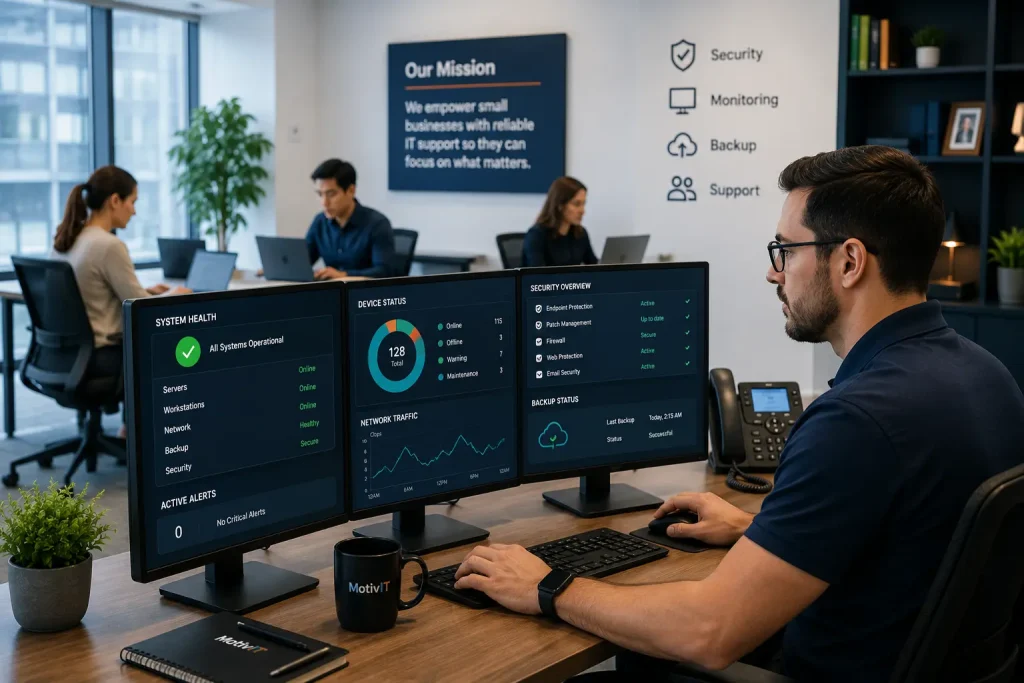
With managed support, monitoring tools may identify signs such as:
- Failed backups
- Devices missing critical updates
- Unstable network equipment
- Low server storage
- Repeated application errors
- Unusual account activity
- Offline workstations or servers
Earlier visibility gives the provider an opportunity to investigate before the issue affects more employees or systems.
No MSP can eliminate every outage. Hardware failures, cloud-provider incidents, power interruptions, cyberattacks, and human mistakes can still occur.
The value comes from earlier detection, defined escalation, better documentation, and stronger recovery preparation.
Strengthen Small Business Cybersecurity
This may include:
- Patch management
- Multi-factor authentication
- Endpoint protection
- Email filtering
- User-access reviews
- Backup monitoring
- Employee offboarding
- Security-awareness support
- Incident escalation
Common SMB security gaps include former employees retaining access, backup failures going unnoticed, MFA being used inconsistently, and security alerts having no clear owner.
A managed approach gives these responsibilities defined processes and accountability.
Businesses can learn more about the connection between managed support and small business cybersecurity.
Give Employees a Reliable Support Path
Employees may ask coworkers for workarounds, delay reporting suspicious activity, or spend hours trying to resolve login, email, printer, and software-access problems themselves.
Managed IT helpdesk services give employees one consistent support channel. Requests can be documented, prioritized, tracked, escalated, and reviewed for recurring patterns.
This allows employees to return to their work while giving leadership better visibility into support activity.
Support Business Growth Without Immediate Hiring
Each new employee may require:
- A configured device
- A Microsoft 365 account
- Application permissions
- Security settings
- Cloud access
- Onboarding assistance
- Ongoing technical support
Opening another office may require internet services, network equipment, workstations, vendors, and backup planning.
An MSP already has technicians, monitoring platforms, support processes, and specialized resources in place. This allows coverage to expand without the business immediately hiring several internal IT employees.
GTIA’s 2025 SMB technology research found that 61% of surveyed SMBs outsourced IT services regularly or occasionally. It also found that only 32% believed they excelled at ongoing technology operations, while 80% acknowledged room for improvement in technology vision and strategy.
Improve IT Planning and Cost Visibility
A business may spend little for several months, then face a significant expense after a server failure, security incident, or data-recovery project.
Managed services typically use a recurring fee based on users, devices, service levels, or included tools.
This does not mean managed IT is automatically less expensive or that every project is included. The benefit is greater visibility into what the provider manages, which tools and protections are covered, and how recurring support will be budgeted.
Review your devices, support history, cybersecurity, backups, Microsoft 365 environment, and vendor responsibilities before another issue interrupts the business.
Signs Your Business Has Outgrown Break-Fix IT
The better question is whether the business has become too dependent on technology for reactive support to remain practical.
Your company may have outgrown break-fix IT when:
- Technical problems repeatedly interrupt employee work
- Support response times are inconsistent
- No one is monitoring backups or network health
- The business is unsure whether systems are fully patched
- Cybersecurity responsibilities are unclear
- Managers spend too much time coordinating IT problems
- Remote or hybrid employees lack consistent support
- Microsoft 365 permissions are becoming difficult to manage
- The company is adding employees, locations, or cloud platforms
- Technology expenses are unpredictable
- One internal IT employee is overloaded
- Business continuity and disaster recovery have not been documented
Industry-Specific Triggers
During tax season, a short email, document-access, or backup problem can delay filings and client responses. Managed support can add help desk capacity while maintaining Microsoft 365, user accounts, endpoint security, and backups.
Lending companies
A lending business may rely on loan-origination software, customer portals, document-management platforms, and third-party verification services. Ongoing access management, vendor coordination, backup monitoring, and cybersecurity can reduce delays and protect borrower documents.
Financial services firms
Financial services organizations may need stronger email protection, MFA, logging, endpoint security, backup testing, and documented incident procedures. An MSP can manage technical controls while leadership retains responsibility for business and regulatory decisions.
Healthcare practices
A practice with multiple locations may rely on scheduling platforms, cloud applications, secure communications, and employee devices. Break-fix support may repair one workstation, but it may not provide continuous access management, backup oversight, monitoring, or compliance-aware security.
Manufacturing businesses
Manufacturers may depend on workstations, network equipment, inventory tools, production applications, and vendor systems. Ongoing network management can reveal recurring patterns that are easy to miss when every issue is treated as an isolated repair.
Growing technology companies
A startup adding employees quickly may struggle with device preparation, permissions, cloud applications, cybersecurity, and offboarding. Outsourced IT services can establish repeatable processes before access and asset management become disorganized.
In each case, the business needs more than occasional troubleshooting. It needs ongoing technology management aligned with real operational requirements.
Moving from Break-Fix to Managed IT Services
1. Assess the Current IT Environment
- Users and locations
- Workstations and servers
- Network equipment
- Microsoft 365 and cloud applications
- Security tools
- Backup systems
- Internet and software vendors
- Business-critical applications
- Existing support arrangements
- Compliance or industry requirements
This establishes a baseline and identifies unsupported systems, missing documentation, recurring problems, and immediate security risks.
2. Define Responsibilities Clearly
- Included users and devices
- Support hours
- Response expectations
- Monitoring coverage
- Cybersecurity tools
- Backup responsibilities
- Microsoft 365 administration
- Vendor coordination
- On-site support
- Project work
- Escalation procedures
- Additional fees
Clear ownership prevents confusion after onboarding.
3. Standardize and Document
Good documentation helps technicians support employees consistently and respond more effectively when incidents occur.
4. Prioritize the Highest Risks
- Unsupported operating systems
- Missing MFA
- Unprotected devices
- Unmonitored backups
- Failing hardware
- Weak administrative accounts
- Incomplete employee offboarding
- No incident-response process
Lower-priority improvements can be placed on a longer-term technology roadmap.
5. Review the Relationship Regularly
Managed IT should remain connected to business goals rather than becoming another service that receives attention only when something goes wrong.
Choosing the Right MSP for a Small Business
It should explain how its services will improve productivity, security, continuity, and growth.
| Area | Questions to Ask |
|---|---|
| Help desk | How do employees request support, and what hours are covered? |
| Monitoring | Which devices, systems, networks, and alerts are monitored? |
| Cybersecurity | Which protections are included in the service plan? |
| Backups | Who monitors backup failures, and how is restoration tested? |
| Microsoft 365 | Are users, permissions, email, licensing, and MFA managed? |
| Response expectations | How are urgent and routine requests prioritized? |
| On-site support | Is it available, and is it included or billed separately? |
| Vendor management | Will the MSP coordinate with internet, software, and equipment providers? |
| Reporting | What reports will leadership receive? |
| Technology planning | Are business reviews and roadmaps included? |
| Scalability | Can the service expand as the company grows? |
| Compliance | Does the provider understand your industry’s requirements? |
| Co-managed IT | Can the provider work with an existing internal employee? |
Businesses that rely heavily on cloud platforms can explore MotivIT’s cloud services for cloud management, monitoring, data redundancy, security, and disaster recovery.
Compare your support coverage, cybersecurity, Microsoft 365 management, monitoring, backups, and recovery planning with what your business actually needs.
Frequently Asked Questions About Small Business IT Support
What is break-fix IT support?
Do small businesses need managed IT services?
Are managed IT services better than break-fix support?
Is break-fix IT cheaper than managed IT?
Managed IT generally provides a broader and more predictable service scope.
What should managed IT services for small businesses include?
What are outsourced IT services?
What is proactive IT support?
Can an MSP support an existing internal IT employee?
How long does it take to move to managed IT services?
The timeline depends on the size and condition of the environment. Onboarding may involve discovery, documentation, security reviews, installation of monitoring tools, account cleanup, backup verification, and employee communication.
What should I ask before choosing an MSP?
Does MotivIT provide small business IT support in San Jose?
Yes. MotivIT provides managed and co-managed IT services for San Jose businesses, including employee support, network monitoring, cybersecurity, Microsoft 365 assistance, cloud services, backups, and technology planning.
Move from Reactive Repairs to a Stronger IT Foundation
As a company adds employees, systems, vendors, cloud platforms, and customer responsibilities, waiting for technology to fail transfers more risk to the business. Employees lose productive time, managers become informal IT coordinators, and customers may experience delays while someone searches for a solution.
Managed IT services change more than who fixes the technology. They change how the business identifies risks, supports employees, maintains systems, responds to incidents, and prepares for growth.
MotivIT helps small businesses replace fragmented, reactive support with a managed IT model built around reliability, cybersecurity, employee productivity, and business continuity.
The question is not whether another technology problem will occur. It is whether your business will identify it early, respond effectively, and continue operating when it does.
That is the difference between having someone available to repair IT and having an IT strategy that protects the business.
Contact MotivIT to review your current support model, identify operational and cybersecurity gaps, and build a managed IT plan that supports your next stage of growth.